

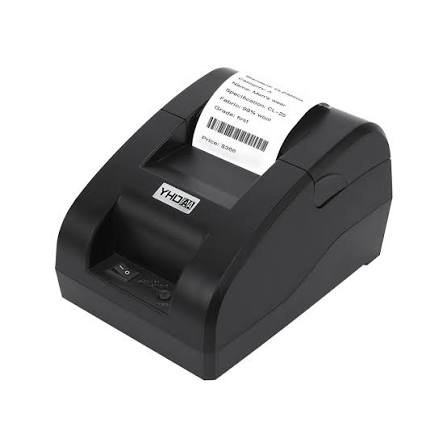
Receipt printing systems play an important role in everyday business operations, particularly in retail stores, restaurants, supermarkets, pharmacies, and service-based companies. They help document transactions, provide customers with purchase records, and support communication between point-of-sale (POS) software and other business equipment. As technology advances, older printing systems may struggle to meet changing operational requirements.
Upgrading printing equipment can improve checkout efficiency, simplify maintenance, and provide better compatibility with modern business software. However, selecting a suitable Receipt Printer requires more than comparing prices or choosing the newest model. Businesses should evaluate their existing infrastructure, transaction volume, connectivity needs, and long-term operating costs before making a decision.
1. Evaluate the Limitations of Your Existing System
Before purchasing new equipment, businesses should identify the problems affecting their current receipt printing setup. An upgrade may be necessary when printers frequently malfunction, produce unclear receipts, operate too slowly, or require repeated maintenance.
Some businesses may also discover that their existing devices are incompatible with newer POS software or operating systems. In these situations, replacing outdated equipment can prevent recurring technical problems.
A practical evaluation should consider:
- Frequency of paper jams and printing errors.
- Print speed during busy operating periods.
- Quality and readability of printed receipts.
- Connection stability and compatibility.
- Maintenance requirements and repair costs.
- Availability of replacement parts and technical support.
Understanding these limitations helps businesses determine whether a complete system upgrade is necessary or whether smaller improvements could solve the problem.
2. Determine Your Daily Printing Requirements
Different businesses have different printing demands. A small retail shop may process a limited number of transactions each day, while a supermarket or busy restaurant may need equipment capable of handling continuous printing.
Transaction volume should therefore influence printer selection. Businesses with high daily workloads generally need reliable devices with suitable printing speeds, durable components, and consistent paper handling.
It is also important to consider peak operating periods. A printer that performs adequately during quiet hours may become a bottleneck during lunch periods, seasonal sales, or promotional events.
Reviewing actual transaction data can help businesses estimate the printing capacity required for their upgraded systems.
3. Check Compatibility with Existing POS Software
<AsyncImage query=”retail point of sale computer touchscreen receipt printer checkout workstation” aspectRatio=”16:9″ maxHeight={190}/>
One of the most important considerations when upgrading is compatibility with existing POS software. Even a technically advanced printer may not work properly if its drivers, communication protocols, or operating system support do not match the business’s software environment.
Before selecting new equipment, businesses should confirm that it supports their POS application and operating system. They should also check whether the software requires particular printer commands, drivers, or configuration settings.
If the business plans to replace its POS software soon, choosing a printer compatible with the intended platform can prevent another equipment replacement later.
Testing the printer with the actual POS environment before full deployment is a useful way to identify integration problems early.
4. Compare Available Connectivity Options
Modern receipt printers offer several connection methods, each suited to different working environments.
| Connectivity type | Common applications | Main consideration |
|---|---|---|
| USB | Traditional checkout stations | Requires a direct connection |
| Ethernet | Networked business environments | Requires suitable network configuration |
| Bluetooth | Mobile POS devices | Depends on compatible devices and connection range |
| Wi-Fi | Wireless POS arrangements | Requires stable network coverage |
| Serial | Some established POS systems | May require specific interface support |
Businesses should select connectivity based on their existing equipment and planned workflow. A fixed checkout counter may work well with USB, while a restaurant with multiple service areas may benefit from network or wireless printing.
It is also important to verify whether the printer supports the required connection method as standard or needs an optional interface.
5. Understand the Differences Between Printing Technologies
Receipt printers commonly use thermal or impact printing technology. Each has advantages depending on the business application.
Direct Thermal Printing
Direct thermal printers use heat-sensitive paper to produce text and graphics. They do not require ink cartridges or toner, making them suitable for many retail and hospitality applications.
These printers generally operate quietly and can produce receipts quickly. However, the printed image may fade when exposed to excessive heat, sunlight, or unsuitable storage conditions.
Impact or Dot Matrix Printing
Impact printers use printheads and ink ribbons to transfer characters onto paper. They are often used in environments where multi-part forms or specific paper requirements are important.
They can be noisier and may require more consumables than thermal printers, but they remain useful for certain specialized applications.
The right technology depends on receipt requirements, operating conditions, consumable availability, and the type of records a business needs to produce.
6. Consider Printing Speed and Output Quality
Printing speed affects how quickly transactions can be completed. In busy environments, slow output can increase waiting times and create congestion around checkout counters.
However, speed should not be the only performance measure. Businesses should also examine print resolution, text clarity, graphics support, and consistency.
Receipts need to display important details such as product names, prices, taxes, payment information, and transaction references clearly. Poor print quality can make these records difficult to read and may create unnecessary customer service issues.
Testing sample receipts with typical business content is a practical way to compare different models before purchasing.
7. Review Paper Width and Compatibility
<AsyncImage query=”thermal receipt paper rolls different widths next to desktop POS receipt printer” aspectRatio=”16:9″ maxHeight={190}/>
Receipt printers are designed to support particular paper widths and roll dimensions. Businesses should confirm that new equipment matches their existing receipt format or planned printing requirements.
Paper compatibility affects more than the physical fit of the roll. It can also influence receipt layout, printing capacity, and replacement supply costs.
Before upgrading, check:
- Supported paper widths.
- Maximum roll diameter.
- Paper thickness requirements.
- Loading and replacement procedures.
- Availability of compatible paper from suppliers.
Choosing a printer that uses readily available consumables can simplify purchasing and reduce the risk of operational interruptions.
8. Calculate the Total Cost of Ownership
The purchase price is only one part of the cost of upgrading a receipt printing system. Businesses should consider the expenses associated with installation, consumables, maintenance, software compatibility, and future repairs.
Thermal printers generally eliminate the need for ink or toner, although they still require suitable thermal paper and periodic maintenance. Impact printers may involve ribbon replacement and additional servicing.
A total cost assessment should include:
- Initial equipment purchase.
- Installation and configuration.
- Paper and other consumables.
- Maintenance and repair expenses.
- Staff training.
- Software or interface requirements.
- Expected equipment lifespan.
Comparing these costs over the expected service period provides a more realistic picture of the investment.
9. Examine Durability and Build Quality
Receipt printers used throughout the day need to withstand repeated operation, paper loading, and regular interaction from employees. Equipment installed in restaurants or busy retail environments may also face dust, moisture, accidental impacts, or frequent movement.
Businesses should examine construction quality, printhead durability, cutter performance, and the reliability of paper-feeding components.
It is also useful to review the manufacturer’s product specifications and warranty conditions. A printer with suitable construction and accessible replacement parts may be easier to maintain over time.
The operating environment should guide durability requirements rather than relying only on general product descriptions.
10. Plan for Installation and System Integration
Replacing a printer may seem straightforward, but an upgrade can affect several parts of the checkout environment. The new device may need to be connected to POS terminals, payment systems, cash drawers, kitchen software, or network infrastructure.
A planned installation process can reduce disruption. Businesses should identify where each printer will be installed, which devices it must communicate with, and whether software settings need to be updated.
For larger operations, testing one device before replacing all existing printers can help reveal configuration problems.
A phased installation may also allow employees to continue processing transactions while technical teams complete the upgrade.
11. Consider Employee Training and Ease of Use
Even a well-designed printing system can create operational difficulties if employees do not understand how to use it.
Staff should know how to load paper, replace consumables, recognize common error indicators, and perform basic troubleshooting. They should also understand how to handle connection failures and report recurring technical issues.
Simple maintenance procedures can reduce unnecessary service calls and prevent small problems from interrupting business operations.
Businesses upgrading several checkout stations should provide consistent instructions so that employees can operate different devices confidently.
12. Review Security and Network Management
Network-connected receipt printers introduce additional considerations for businesses that rely on shared digital infrastructure.
Organizations should understand how printers connect to their networks, which devices can send print jobs, and whether the equipment supports appropriate configuration controls.
Practical precautions include:
- Changing default administrative credentials when applicable.
- Keeping printer firmware updated where updates are provided.
- Restricting access to trusted devices and networks.
- Using secure network configurations.
- Following the POS provider’s recommendations for connected hardware.
These measures help businesses manage connected printing equipment as part of their wider IT environment.
13. Check Warranty, Technical Support, and Replacement Parts
Reliable after-sales support is important when receipt printers are essential to daily transactions. A device failure can delay checkout operations, affect order processing, and create additional work for employees.
Before purchasing, businesses should review warranty coverage, repair procedures, technical support availability, and access to replacement components.
It is also worth checking whether the supplier provides documentation, driver downloads, setup guidance, and troubleshooting resources.
A clear support arrangement can make long-term equipment management easier, particularly for businesses operating multiple printers.
14. Assess Whether Your Business Needs Mobile Printing
Some businesses may benefit from portable receipt printing rather than relying exclusively on fixed checkout stations.
Restaurants can use mobile printing arrangements for table-side service, while delivery businesses may need compact printers for transactions completed outside traditional retail locations.
Before selecting portable equipment, businesses should evaluate battery life, connection stability, device compatibility, portability, and expected printing volume.
Mobile printers may not be necessary for every operation, but they can provide additional flexibility where employees need to process transactions away from a fixed counter.
15. Test Equipment Before Completing the Upgrade
Product specifications provide useful information, but real-world testing can reveal issues that are difficult to identify from a product description alone.
Businesses should request a sample or demonstration when possible. Testing should include normal receipt formats, peak transaction conditions, connection stability, and compatibility with the existing POS system.
It is also helpful to check paper loading, cutter operation, print clarity, and the time required to recover from common errors.
For larger purchases, a pilot installation at one checkout station can help confirm whether the selected equipment meets operational expectations before wider deployment.
Conclusion
Upgrading a receipt printing system can help businesses improve transaction efficiency, reduce recurring equipment problems, and prepare for changing POS requirements. However, a successful upgrade depends on careful planning rather than simply purchasing newer hardware.
Businesses should evaluate printing volume, software compatibility, connectivity, paper requirements, durability, installation costs, and technical support before making a decision. Testing equipment in the intended working environment can further reduce the risk of unexpected problems.
By considering both current operational needs and future technology requirements, organizations can select a receipt printing system that supports reliable daily transactions and remains practical over the long term.