

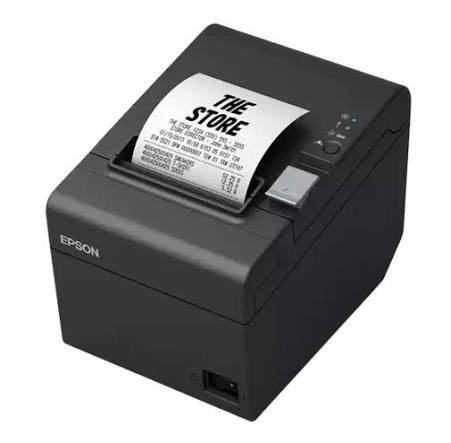
Choosing the right printing equipment is an important decision for businesses that depend on receipts, product labels, shipping documents, and other printed materials. Whether a company operates in retail, hospitality, logistics, healthcare, or manufacturing, reliable printing helps maintain efficient daily operations. The quality of the equipment can influence printing consistency, maintenance requirements, operating costs, and overall productivity.
Selecting a suitable supplier requires more than comparing product prices. A dependable Thermal Printer Manufacturer should offer appropriate product options, consistent manufacturing standards, technical support, and the ability to meet changing business requirements. Understanding the factors that distinguish reliable manufacturers can help businesses make informed purchasing decisions and establish productive long-term partnerships.
1. Understand Your Business Printing Requirements
Before evaluating manufacturers, identify the specific printing tasks your business needs to perform. Different applications require different printer designs, performance levels, and technical features.
For example, a retail store may need receipt printers for checkout counters, while a warehouse may require barcode and shipping label printers. Manufacturing facilities may need equipment capable of handling continuous printing in demanding environments.
Consider the following questions:
- What type of documents or labels will you print?
- How many prints will you produce each day?
- What print width and resolution do you require?
- Will printers operate continuously or intermittently?
- Do you need desktop, mobile, or industrial equipment?
- Which devices and software must connect to the printers?
A clear understanding of these requirements makes it easier to compare manufacturers based on relevant capabilities rather than unnecessary features.
2. Evaluate the Manufacturer’s Product Range
A reliable manufacturer should provide products suited to different business applications. A broad product range can also make it easier to source multiple printing solutions from one supplier.
Common thermal printing categories include:
Direct Thermal Printers
Direct thermal printers use heat-sensitive paper or labels to create images without ink or toner. They are commonly used for receipts, tickets, shipping labels, and short-term identification.
Thermal Transfer Printers
Thermal transfer printers use a heated printhead and ribbon to transfer ink onto a label surface. They are often selected for applications requiring more durable printed information.
Receipt Printers
Receipt printers are designed for point-of-sale environments, including retail stores, restaurants, supermarkets, and service businesses.
Barcode and Label Printers
These devices produce product identification labels, inventory tags, shipping labels, and barcodes used in logistics and manufacturing.
Mobile Thermal Printers
Portable models support printing in environments where employees need to work away from fixed computer stations.
A manufacturer with several relevant product categories may be better positioned to support a business as its printing needs expand.
3. Check Manufacturing Experience and Industry Knowledge
Manufacturing experience can provide useful insight into a supplier’s ability to understand customer requirements and manage production challenges.
An experienced manufacturer may have established processes for product development, component sourcing, assembly, testing, and quality inspection.
However, the number of years a company has operated should not be the only selection criterion. Businesses should also examine its technical knowledge, product development capabilities, industry experience, and history of serving relevant applications.
Ask potential manufacturers about the industries they serve and whether they have experience producing printers for similar operating environments.
4. Examine Product Quality and Durability
Printer quality directly affects daily business operations. Equipment that frequently experiences paper-feeding problems, communication failures, or printhead issues can interrupt workflows and increase maintenance expenses.
When evaluating product quality, consider:
- Printhead durability
- Paper-feeding mechanism reliability
- Housing and component quality
- Printing consistency
- Operating temperature range
- Supported media specifications
- Expected maintenance requirements
A dependable manufacturer should have established procedures for checking components and testing finished products.
It is also useful to request product specifications and sample units so that the equipment can be evaluated under realistic working conditions.
5. Review Print Speed and Resolution
Print speed and resolution are two important technical factors when choosing a thermal printer.
Print speed determines how quickly a device can produce receipts or labels. High-speed printing can be useful in supermarkets, warehouses, and other environments with frequent print requests.
Resolution affects the clarity of text, graphics, and barcodes. Common thermal printer resolutions include 203 DPI and 300 DPI, while some specialized applications require higher resolution.
The right specifications depend on the intended use. A basic receipt printer may not need the same resolution as a printer producing small product labels with detailed barcodes.
Businesses should compare real operating performance, not just maximum specifications listed in product brochures.
6. Assess Connectivity and Software Compatibility
Modern businesses often use integrated software to manage transactions, inventory, orders, and shipping activities. Printers must communicate reliably with these systems.
Common connectivity options include:
- USB
- Ethernet
- Bluetooth
- Wi-Fi
- Serial interfaces
Not every printer supports all connection types, so businesses should confirm compatibility with their existing devices.
Software support is equally important. Check whether the manufacturer provides suitable drivers, configuration utilities, development tools, and documentation for the operating systems and applications used by your organization.
Compatibility with existing POS, warehouse management, and enterprise software can reduce installation difficulties and help maintain efficient workflows.
7. Investigate Quality Control Procedures
Quality control is essential for maintaining consistency across production batches. Even a well-designed printer may create operational problems if manufacturing and inspection processes are inconsistent.
Ask manufacturers how they inspect products during different production stages.
A structured quality assurance process may include:
- Incoming component inspection.
- Verification of assembly procedures.
- Printhead and printing performance tests.
- Paper-feeding and media compatibility checks.
- Connectivity and interface testing.
- Final product inspection.
- Packaging and shipment verification.
Businesses can also request information about relevant quality management certifications and testing standards. Certifications should be verified where necessary rather than accepted solely on the basis of marketing claims.
8. Compare Customization and OEM/ODM Capabilities
Some businesses require standard printers, while others need customized equipment for specific applications or branded product lines.
A manufacturer offering OEM or ODM services may provide different levels of customization, depending on its engineering and production capabilities.
Possible customization areas include:
- Product appearance and housing design
- Logo placement and branding
- Interface configurations
- Firmware and software settings
- Packaging and documentation
- Printing width and media handling
- Specialized mounting arrangements
Before selecting a customization partner, discuss technical requirements, minimum order quantities, development costs, sample approval procedures, and production timelines.
Clear communication at the beginning of a project helps reduce misunderstandings during development and manufacturing.
9. Evaluate Research and Development Capabilities
Printing technology continues to evolve as businesses adopt wireless systems, cloud applications, mobile devices, and automated workflows.
Manufacturers with active research and development capabilities may be better prepared to improve product performance and respond to changing market requirements.
Look for evidence of product innovation, engineering expertise, firmware development, and the ability to adapt existing designs.
It is also worth asking how the manufacturer handles product updates and whether new models are designed with compatibility and maintenance in mind.
10. Check Technical Support and After-Sales Service
A printer purchase should not be viewed as a transaction that ends when the equipment is delivered. Businesses may need technical assistance during installation, configuration, troubleshooting, and maintenance.
Before placing an order, review the manufacturer’s after-sales support arrangements.
Important questions include:
- Does the company provide installation guidance?
- Are product manuals and troubleshooting instructions available?
- Can technical teams assist with software integration?
- Are replacement parts available?
- What warranty coverage is provided?
- How are repair and service requests handled?
Responsive technical support can reduce equipment downtime and help employees resolve common problems more efficiently.
11. Compare Pricing and Total Cost of Ownership
Purchase price is an important consideration, but it should not be the only factor when comparing manufacturers.
A low-cost printer may have higher long-term expenses if it requires frequent maintenance, uses expensive consumables, or has a shorter operating lifespan.
Total cost of ownership may include:
- Initial equipment cost
- Thermal paper or label expenses
- Ribbons for thermal transfer printing
- Replacement printheads and other components
- Maintenance and repair costs
- Installation and integration expenses
- Energy consumption
- Technical support
Businesses should compare quotations using equivalent product specifications and service conditions. This helps identify genuine value rather than focusing only on the lowest initial price.
12. Request Samples Before Ordering in Bulk
Product samples allow buyers to evaluate equipment before making a large purchasing commitment.
Testing a sample can reveal practical details that may not be obvious from a product description.
During evaluation, check:
- Print clarity and consistency
- Actual printing speed
- Barcode readability
- Paper-loading convenience
- Connection stability
- Software installation
- Noise levels
- Overall construction
Where possible, test the printer using the same paper, labels, software, and operating conditions expected in everyday business use.
Sample testing is particularly important for businesses placing large orders or integrating printers into automated production systems.
13. Review Production Capacity and Delivery Reliability
A manufacturer must be able to fulfill orders according to the buyer’s required quantities and schedule.
This is particularly important for distributors, retailers, and companies operating several locations.
Ask about production capacity, manufacturing lead times, order scheduling, packaging arrangements, and shipping procedures.
For large or recurring orders, discuss how the manufacturer manages production planning and handles unexpected delays.
It is also useful to understand whether the supplier can support repeat orders with consistent specifications and product quality.
14. Examine Communication and Business Transparency
Clear communication is an important part of a successful supplier relationship.
A professional manufacturer should provide accurate product information, realistic delivery estimates, understandable quotations, and clear explanations of technical limitations.
During the initial discussions, observe how the company responds to questions and handles detailed requirements.
Warning signs may include:
- Inconsistent product specifications
- Unclear warranty conditions
- Unrealistic delivery promises
- Reluctance to provide samples
- Limited technical documentation
- Unexplained changes in pricing
- Unclear payment or order terms
Transparent communication helps buyers evaluate potential risks before entering a business agreement.
15. Consider Industry-Specific Experience
Different industries have different printing requirements, so relevant application experience can be valuable.
For example, retail businesses often prioritize fast receipt printing and POS compatibility. Logistics companies may need high-volume barcode label production, while healthcare organizations require reliable identification labels and compatibility with specialized systems.
Manufacturing businesses may focus on component tracking, production labeling, and equipment durability.
A manufacturer familiar with the intended application may be able to recommend suitable models, media types, and configurations more effectively.
16. Review Warranty and Replacement Part Availability
Warranty coverage can help protect businesses against certain manufacturing defects and equipment failures.
However, warranty terms vary between manufacturers and products. Buyers should understand the coverage period, exclusions, service process, and responsibilities for shipping or repair costs.
Replacement part availability is another important consideration. Printheads, rollers, power supplies, and other components may eventually require servicing or replacement.
A manufacturer that provides clear warranty documentation and access to compatible replacement parts can help businesses manage equipment over its useful operating life.
17. Assess Long-Term Partnership Potential
A dependable manufacturer should be capable of supporting more than a single order.
As businesses grow, their printing requirements may change. They may need additional printer models, higher production quantities, customized products, or improved software integration.
A long-term supplier relationship can make future purchasing and technical coordination easier.
When assessing partnership potential, consider product consistency, communication, support quality, production flexibility, and the manufacturer’s willingness to understand evolving requirements.
It is also helpful to establish clear expectations for pricing, quality standards, delivery schedules, and product updates.
18. Common Mistakes to Avoid When Selecting a Manufacturer
Businesses can reduce purchasing risks by avoiding several common mistakes.
Choosing only by price: Low initial costs do not necessarily indicate good long-term value.
Ignoring compatibility: A printer that cannot integrate with existing software may require additional development or replacement equipment.
Skipping sample testing: Ordering in bulk without evaluating product performance can create avoidable problems.
Overlooking technical support: Limited after-sales service may increase downtime when equipment problems occur.
Ignoring production capacity: A supplier that cannot fulfill required quantities may disrupt business operations.
Failing to review specifications: Differences in resolution, printing width, interfaces, and media support can affect practical performance.
A structured evaluation process helps businesses avoid these issues and select equipment that matches their operational needs.
Conclusion
Choosing a reliable thermal printer manufacturer requires careful consideration of product quality, technical capabilities, manufacturing experience, software compatibility, pricing, and after-sales support. Businesses should begin by identifying their printing requirements and then evaluate potential manufacturers against clear technical and commercial criteria.
Product samples, quality control information, warranty terms, and transparent communication can provide additional confidence before placing an order. By looking beyond initial purchase price and considering long-term performance, organizations can establish supplier relationships that support reliable printing and efficient business operations.