
Thermal printers have become important tools for businesses that need to produce receipts, labels, tickets, and other printed records quickly. Retail stores, restaurants, warehouses, pharmacies, and service providers use these devices to support daily operations and improve document handling. However, choosing the right printer requires more than comparing prices or selecting a model based on appearance.
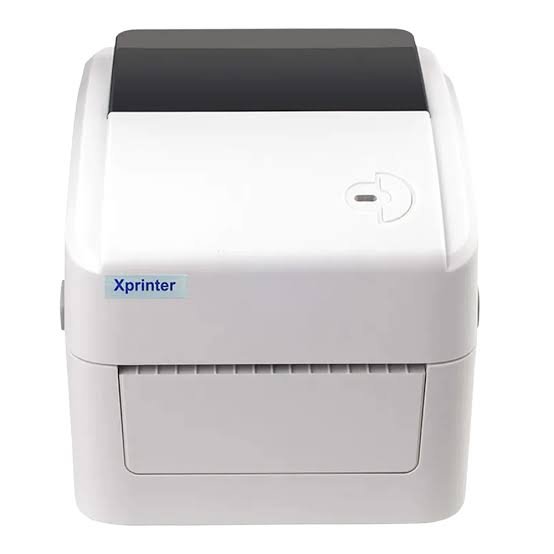
Different businesses have different printing requirements, software environments, and workloads. Before purchasing an Xprinter Thermal Printer, buyers should evaluate its specifications, compatibility, intended application, and long-term operating costs. A careful assessment can help prevent unnecessary expenses and ensure the equipment meets practical business needs.
1. Identify Your Primary Printing Requirements
The first step is understanding what the printer will be used for. Thermal printers are available in different configurations, and a model designed for receipt printing may not be suitable for every labeling or ticketing application.
Consider the type of documents your business produces:
- Receipts: Retail stores, supermarkets, and restaurants often need compact printers for transaction records.
- Product labels: Warehouses and inventory departments may require printers designed for barcode and label production.
- Tickets: Transportation providers and event organizers may need equipment that supports specific ticket formats.
- Order slips: Restaurants and food service businesses may use printers to produce kitchen or order records.
Defining the intended application helps narrow down the available models and prevents buying equipment with unsuitable features.
2. Choose Between Direct Thermal and Thermal Transfer Technology
Thermal printing generally includes two main technologies: direct thermal and thermal transfer. Understanding their differences is essential because each serves different printing requirements.
Direct thermal printing uses a heated printhead to activate specially coated paper. It does not require ink, toner, or a separate ribbon. This method is commonly used for receipts, temporary labels, and tickets.
Thermal transfer printing uses heat to transfer ink from a ribbon onto the printing material. It can produce more durable labels suitable for applications where printed information needs to remain readable for longer periods.
Before buying, determine whether your business needs short-term receipt printing or more durable printed materials.
3. Evaluate Printing Speed
Printing speed affects how efficiently employees can complete transactions and other routine tasks. A slow printer may create delays at busy checkout counters or interrupt workflows in warehouses and restaurants.
Manufacturers usually specify printing speed in millimeters per second (mm/s). Buyers should compare this figure across models while considering actual operating conditions.
Important factors include:
- Expected daily printing volume.
- Average receipt or label length.
- Peak-hour transaction frequency.
- Complexity of printed content.
- Time required for data processing.
A higher rated speed can be useful in demanding environments, but it should be considered alongside print quality and overall reliability.
4. Check Print Resolution and Output Quality
Print resolution determines how clearly a printer reproduces text, barcodes, logos, and graphics. It is commonly measured in dots per inch (DPI).
For ordinary receipts containing transaction details, standard resolution may be sufficient. Applications involving small text, detailed symbols, or compact barcodes may require higher resolution.
Buyers should also examine sample prints when possible. Check whether characters are sharp, lines are consistent, and barcodes can be scanned reliably.
Print quality depends not only on the printer’s resolution but also on the paper or label material, printhead condition, and software settings.
5. Confirm Paper Size and Media Compatibility
Paper compatibility is an important purchasing consideration because thermal printers support specific media widths, roll diameters, and thickness ranges.
For example, receipt printers commonly support particular roll widths, while label printers may accommodate different label dimensions and media types.
Before making a purchase, verify:
- Supported paper or label width.
- Maximum roll diameter.
- Compatible paper thickness.
- Supported media types.
- Paper loading method.
- Availability of replacement rolls.
Using unsuitable media can cause feeding problems, inconsistent printing, or unnecessary wear on internal components.
6. Examine Connectivity Options
A thermal printer must communicate reliably with the device or system that sends printing instructions. Different models offer different connection interfaces, so buyers should confirm compatibility with their existing equipment.
Common connectivity options include:
USB: A practical choice for direct connections to computers and compatible POS terminals.
Ethernet: Useful for businesses that need to connect printers to a local network or shared workstation environment.
Bluetooth: Suitable for compatible mobile devices and wireless printing applications.
Serial connection: Still used in certain commercial systems and specialized equipment.
Not every printer includes every interface. Check the product specifications and confirm that the required cables, drivers, and connection methods are supported.
7. Verify POS Software and Operating System Compatibility
Hardware compatibility is only one part of the purchasing decision. The printer must also work with the business’s POS software, operating system, and printing applications.
A printer that cannot communicate correctly with existing software may require additional configuration or replacement equipment.
Before ordering, check:
- Supported Windows, Linux, or other operating systems.
- Available drivers.
- Supported printing command languages.
- Compatibility with the intended POS application.
- Documentation and installation instructions.
- Availability of software updates.
If the business uses specialized POS software, it is useful to confirm compatibility with the software provider before purchasing the printer.
8. Consider Daily Printing Volume and Durability
A printer used occasionally in a small shop has different requirements from equipment operating continuously in a supermarket or distribution center.
Buyers should assess the expected number of prints per day and the conditions in which the printer will operate.
Relevant specifications may include:
- Printhead service life.
- Cutter durability, if included.
- Operating temperature and humidity range.
- Recommended duty cycle.
- Mechanical design.
- Warranty coverage.
A printer designed for frequent commercial use may be a more suitable choice for businesses with heavy workloads. However, durability claims should be evaluated using documented specifications rather than assumptions based on price or appearance.
9. Review Automatic Cutter Features
Many receipt printers include an automatic cutter that separates printed receipts from the remaining paper roll. This feature can reduce manual handling and improve convenience at busy service counters.
There are different cutter arrangements, including full-cut and partial-cut mechanisms. Their suitability depends on how receipts are distributed and handled.
When comparing models, consider:
- Whether an automatic cutter is necessary.
- The cutter’s rated service life.
- Replacement and maintenance requirements.
- Whether the printer supports manual tearing.
- How frequently receipts are printed.
For low-volume environments, a manual tear bar may be sufficient. High-volume businesses may benefit from an automatic cutter if it fits their workflow.
10. Assess Printer Size and Installation Space
The physical dimensions of a printer can affect workstation organization. Small retail counters, reception desks, and restaurant service stations often have limited space for additional equipment.
Measure the available area before selecting a model. Also consider whether employees can easily access the paper compartment, open the printer cover, and connect cables.
For mobile or space-restricted applications, portable models may be worth evaluating. Stationary desktop printers are often more appropriate for fixed checkout counters and workstations.
Good placement should allow convenient operation while keeping the equipment away from excessive dust, moisture, and heat.
11. Compare Initial Price with Total Ownership Cost
The purchase price is important, but it does not represent the complete cost of operating a thermal printer. Businesses should consider recurring supplies, maintenance, repairs, and possible replacement expenses.
A realistic cost assessment should include:
| Cost factor | What to evaluate |
|---|---|
| Initial purchase | Printer price and included accessories |
| Paper or labels | Cost and availability of compatible media |
| Replacement parts | Printheads, cutters, and other components |
| Maintenance | Cleaning and routine servicing requirements |
| Software | Drivers or any additional software costs |
| Warranty | Coverage period and repair conditions |
Direct thermal printers do not require ink or toner, which can simplify consumable management. However, thermal paper remains a recurring expense. Thermal transfer models may also require compatible ribbons.
Comparing total ownership costs helps businesses make more practical purchasing decisions.
12. Check Warranty and Technical Support
After-sales support can make a significant difference when a printer develops a technical problem. Businesses that depend on continuous receipt or label printing may experience operational disruption if equipment remains unavailable for an extended period.
Before buying, review the warranty terms and available support services.
Important questions include:
- How long is the warranty valid?
- Which components are covered?
- Are repairs available locally?
- Can replacement parts be obtained easily?
- Is technical documentation available?
- How can users contact customer support?
Clear warranty conditions and accessible support can reduce uncertainty throughout the printer’s service life.
13. Look at Ease of Installation and Maintenance
A printer that is difficult to configure or maintain can create additional work for employees. Simple installation procedures and accessible maintenance features are therefore valuable considerations.
Buyers should examine how easily the printer can be connected, loaded with paper, and configured through the required drivers or software.
Routine maintenance may involve cleaning the printhead, inspecting rollers, removing paper debris, and checking cables. Models with straightforward access to frequently maintained components can make these tasks easier.
It is also useful to check whether the manufacturer provides user manuals and troubleshooting guidance.
14. Consider Future Business Requirements
Business printing needs can change as operations expand. A small store may eventually add more checkout stations, introduce online order processing, or increase its daily transaction volume.
Choosing equipment with suitable flexibility can help avoid early replacement.
Think about possible future requirements such as:
- Higher printing volumes.
- Additional POS terminals.
- Network-based printing.
- New software systems.
- Different receipt or label formats.
- Expanded business locations.
However, buying a model with unnecessary advanced features can increase costs without providing meaningful benefits. The goal is to select equipment that meets current requirements while allowing reasonable room for growth.
15. Compare Specifications Before Making a Final Decision
Once the main requirements are clear, create a shortlist of suitable models and compare their specifications side by side.
A comparison should cover printing technology, speed, resolution, media compatibility, interfaces, software support, dimensions, durability, and warranty conditions.
Where possible, request product documentation or test a sample unit before placing a large order. This is particularly important for businesses purchasing printers for several locations or multiple workstations.
A practical evaluation process reduces the risk of choosing equipment based only on marketing descriptions.
Conclusion
Buying a thermal printer requires careful consideration of the tasks it will perform and the environment in which it will operate. Printing speed, resolution, media compatibility, connectivity, software support, durability, and maintenance requirements all influence whether a model is suitable for a particular business.
By comparing these factors with actual operational needs, buyers can select equipment that supports efficient printing without unnecessary costs. A well-informed purchasing decision can also simplify maintenance, improve workflow consistency, and provide better value over the printer’s working life.